

Fill out web forms automatically, with an AI agent.

Give TinyAgent a form URL and the details to enter. It opens the page in a cloud browser, fills every field, handles dropdowns and checkboxes, submits, and returns the confirmation. No selectors, no scripts to maintain.

Free to start. $8 in Wallet funds on us, no card needed.

A real run, step by step

Prompt

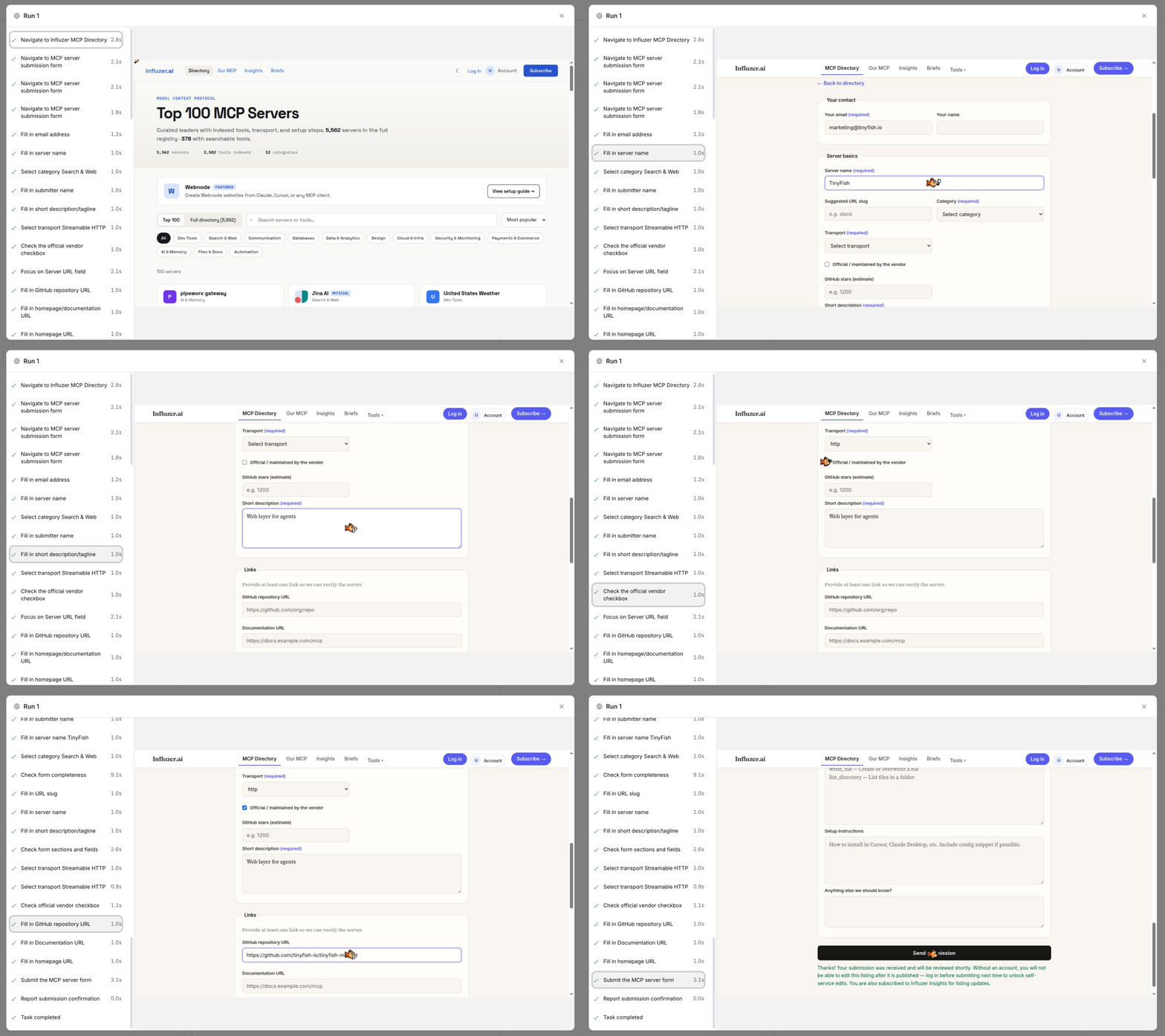
Open the MCP directory submission form, fill in our server name, URL, description, transport, auth, homepage, GitHub and license, then submit and return the confirmation.

TinyAgent session view filling in and submitting a directory listing form, with the completed steps listed on the left and the live form on the right.
Returned by TinyAgent: Thanks! Your submission was received and will be reviewed shortly. 19 steps, one run.

From a goal to a submitted form.

  1. 01

    Give it the form

    You
    Paste the form URL and the values to enter, in plain language or as JSON.
    TinyAgent
    TinyAgent opens the page in a cloud browser and reads the fields as they are right now.
  2. 02

    Let it fill and submit

    You
    Nothing.
    TinyAgent
    TinyAgent fills text, dropdowns, checkboxes, dates and multi-step forms, waits for validation, and presses submit.
  3. 03

    Read the result

    You
    Read the result.
    TinyAgent
    TinyAgent returns the submitted values and the site's confirmation message, and flags any field it could not fill.

Start in a chat. Or build with the API.

Describe the form. TinyAgent fills it.

Install the TinyFish plugin in ChatGPT or Claude, then describe the form and the details the way you would brief a colleague. For forms behind a login, sign in once through TinyProfiles.

Use TinyFish to submit our tool to the directory at [URL]: name TinyFish, email marketing@tinyfish.io, homepage docs.tinyfish.chat, and this description: Web layer for agents. Submit and tell me the confirmation.

Set up ChatGPT or Claude

Submit forms from your own data.

Call TinyAgent with the form URL and a goal built from your CRM, sheet or queue. One call per record; run them in parallel.

Fill out and submit a form from one call:

from tinyfish import TinyFish, EventType, RunStatus

client = TinyFish()

with client.agent.stream(
    url="https://example.com/apply",
    goal="""Fill out the form with name Jane Lee, email jane.lee@example.com, company Example Co, then submit. Return the confirmation text.""",
) as stream:
    for event in stream:
        if event.type == EventType.COMPLETE and event.status == RunStatus.COMPLETED:
            print("Result:", event.result_json)

Runs are billed at $0.016 per agent step.Read the docs

Where it is used.

Directory and listing submissions

The same product details into every marketplace, directory and launch site, submitted and confirmed.

See TinyAgent

Job and program applications

One applicant's details across career portals that have no API.

See TinyAgent

Vendor and supplier portals

Registrations, invoices and compliance forms on sites built for humans.

See TinyAgent

Lead and intake forms

Push CRM records into partner forms, one call per record.

See TinyAgent
TinyFish is rated 4.4 out of 5 on G2 - Users Love Us badge

Verified on G2

4.4 out of 5 on G2

  • TinyFish is the one layer I actually keep in the stack when I need live web, not another chatbot pretending it can browse. Search, Fetch, Browser, and Agent sit under one API, so I am not wiring Exa for search, Firecrawl for markdown, and Apify for the messy pages.
    Otman M.Deployment Strategist for AI adoption - ConsultingRead on G2 ↗
  • It is super fast! After onboarding it was very easy to get setup. The starter credits that were given were plenty and each search and fetch were free while agent mode provided a good bang for your buck.
    Verified User in Market ResearchRead on G2 ↗
  • I use TinyFish for hackathons and side projects to scrape websites and provide LLMs with precise context, and I love its speed, accuracy, and the fact that it's fast, cheap, and good. It can return information quickly and accurately from links inside websites or from specific links.
    Verified UserRead on G2 ↗
  • What I like most about TinyFish is how well it handles web-based sources that are hard to reach through conventional APIs.
    deepti b.Founder - Health, Wellness and FitnessRead on G2 ↗
  • The configuration is very simple and it supports MCP, making it basically ready to use out of the box.
    David W.Writer & Editor - Fund-RaisingRead on G2 ↗
  • TinyFish is the page-scrape layer I actually trust after a search API. I run Tavily for broad hits, then TinyFish run-sse against a specific URL with a goal — Gensyn docs, DoraHacks briefs, GitHub orgs, hackathon portals — and it returns extractable text instead of “10 blue links.”
    Henry M.Community Associate - Computer SoftwareRead on G2 ↗
  • I hand it a URL and get back clean Markdown instead of a wall of nav bars, cookie banners and ads, which cuts my token cost on every LLM call downstream. Search and Fetch being free is genuinely rare — everyone else meters exactly this.
    Alessio B.Web Developer - InternetRead on G2 ↗
  • TinyFish has become my default web layer inside Claude Code and OpenCode. The MCP connection was easy to set up, and I was running searches and fetches within minutes.
    Kartik S.Founder - InternetRead on G2 ↗
  • The standout feature of TinyFish is its unified, production-ready web agent architecture that replaces fragile scraping scripts with resilient, human-like browser navigation and multi-step workflow execution through a single API
    Ranganath D.Sr Manager - Airlines/AviationRead on G2 ↗
  • Tinyfish is a highly effective tool for agent search and fetch functions. It’s also free
    Verified User in InternetRead on G2 ↗

Questions, answered.

Give TinyAgent your first form.

Free to start. $8 in Wallet funds on us, no card needed.